|
Applies to vehicles: with surround view cameras
Switching on
Engage reverse gear, or
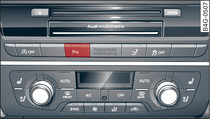
Press the  button in the centre console button', true)">Fig. 1. You will hear a brief acknowledgement tone and the LED in the button will light up.
button in the centre console button', true)">Fig. 1. You will hear a brief acknowledgement tone and the LED in the button will light up.Selecting the mode
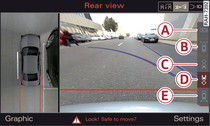
Turn the rotary pushbutton to select the symbol for the desired mode -A- to -E- Fig. 2 and then press the rotary pushbutton.
Switching off
Drive forwards faster than 10 km/h, or
Press the button, or
button, orSwitch off the ignition.